Request Reprocess API
The Request Reprocess API recalculates SLA-related values for existing requests when SLA configurations, holidays, or operational hours are modified.
The API uses the current configurations to recalculate request due-by times, overdue status, and related SLA-dependent actions.
For example, if an unplanned holiday is added, you can reprocess the affected requests to update their SLA calculations and prevent incorrect SLA violations.
You can invoke the API by using scripts or API clients such as Postman.
Supported Module: Requests
Prerequisites
Review the following before invoking the API:
-
Complete all required changes to SLA configurations, holidays, operational-hours, escalations, workflows, and timers.
-
Review the fields enabled for recalculation in GlobalConfig.
-
Review the configured automations and specify the appropriate skip_parameters to prevent unintended actions.
-
Use an SDAdmin authentication token to invoke the API.
-
Avoid frequent bulk reprocessing and schedule it outside operational hours to minimize the impact on application performance.
Access the API Documentation
Go to Admin > API > Documentation and select:
-
Reprocess Request: To reprocess a single request.
-
Reprocess Requests (Bulk): To reprocess multiple requests.
Values Recalculated
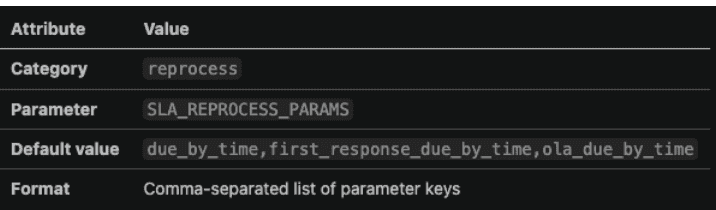
The SLA action recalculates the following values based on the fields enabled in global configuration:
|
Reprocess field |
Values affected |
|
due_by_time |
Request due-by time and overdue status |
|
first_response_due_by_time |
First response due-by time and response overdue status |
|
ola_due_by_time |
Group OLA violation time |
|
time_elapsed |
Time elapsed between request creation and resolution |
|
response_time_elapsed |
Time elapsed between request creation and the first response |
When SLA or due-by times change, pending SLA escalations may be rescheduled based on the current escalation configuration. Escalations that have already been sent are excluded to prevent duplicate notifications.
-
By default, Time Elapsed and Response Time Elapsed are excluded from recalculation. To recalculate these values for closed requests, contact support to enable the corresponding fields in the global configuration.
-
Global configuration settings apply to all portals.
API Endpoints
|
Operation |
Endpoints |
Example |
|
Reprocess multiple requests |
PUT /api/v3/requests/_reprocess |
|
|
Reprocess a single request |
PUT /api/v3/requests/{id}/_reprocess |
Input Data: Response: Sample output : |

Supported Actions
|
Action |
Description |
|
SLA |
Recalculates SLA-related values enabled in the global configuration. |
Parameters
|
Parameter |
Type |
Description |
|
actions |
JSON array |
Specify actions to perform during reprocessing. |
|
ids |
List of IDs |
Request IDs to reprocess. You can specify up to 100 request IDs per call. |
|
skip_parameters |
JSON array |
Automations and validations to exclude during reprocessing. |
Skip Parameters
Reprocessing applies the current request configurations and may trigger automations or validations again.
Before reprocessing requests in production, review the configurations listed below and use skip_parameters to exclude specific operations from reprocessing.
|
Value |
Operations Skipped |
Review Before Skipping |
|
business_rules |
Business rule actions, including field updates, assignments, notifications, webhooks. |
Business rules configured for request update events. |
|
custom_triggers |
Custom trigger actions, including notifications, field updates, scripts, webhooks, and integrations. |
Check triggers configured for notifications, field updates, scripts, webhooks, and integrations. |
|
tech_auto_assign |
Automatic technician assignments |
Technician auto-assignment, load-balancing, round-robin, and group assignment configurations. |
|
closing_rules |
Closure rule validations that may prevent older resolved or closed requests from being reprocessed. |
Review closure requirements for mandatory fields, tasks, approvals, resolutions, notes, and worklogs. |
|
template_mandatory_fields |
Template mandatory field validations that prevent requests that do not contain the newly added mandatory information from being reprocessed. |
Mandatory fields and resource questions added after the requests are created. |
|
timers |
Timer actions from being scheduled, reset, cancelled, or executed. |
Timer stages that depend on Due-by Time or First Response Due-by Time. Note: Do not skip timers if the recalculated values must update the timer schedule. |
|
notification_rules |
Notifications configured under notification rules. |
Notification rules configured for request update events. |
|
all |
All supported operations listed above. |
Verify that none of the listed automations or validations are required during reprocessing. |
Request Behavior During Reprocessing
Reprocessing may affect the following request properties:
-
Last updated time: The request's last-updated timestamp may change even if no request fields are explicitly modified.
-
Read status: The request's read status may change depending on the user invoking the API and the current request owner.
-
Overdue status: SLA and first-response overdue statuses are updated based on the recalculated due-by times.
-
SLA escalations: Pending escalations may be rescheduled based on the current SLA configuration. Already sent escalations are excluded.
-
Requests in Trash:Requests moved to trash are skipped during reprocessing by default.
-
Timer actions and workflow stages that depend on the recalculated due-by times are reprocessed.
Request History
Reprocessing a request adds an entry to the request history, even if no SLA-related time values are changed.
Changes to a request’s due-by time during reprocessing are recorded separately in the request history.
When an SLA is updated, the due by time calculation displays OnHold Detection details in History, indicating the duration for which the request remained on hold.
Reprocessing resets and reapplies the OLA configuration. As a result, OLA violations and other OLA-related entries may appear again in the request history.
Reprocessing Requests with an Inactive SLA
Incident Requests: If the SLA associated with a request is inactive, reprocessing applies the next available SLA that matches the request criteria. If no matching SLA is available, the request’s SLA is reset to None.
Service Requests: If the SLA associated with a request is inactive, editing or reprocessing the request clears the associated SLA, Due By Time, First Response Due By Time, and overdue status.
Reprocessing Requests Without an SLA
If a request has no associated SLA but has a manually configured due-by time, reprocessing applies a matching SLA based on the current configuration. If no matching SLA is available, the due-by time is reset.